WhatsApp Latency Tracker
I came across some interesting vulnerabilities in messaging applications like WhatsApp and Signal while reading a DEF CON 33 research paper. I tried to replicate one of its core concepts: tracking RTT (Round-Trip Time) by measuring the delay between sending a signal and receiving the delivery receipt from the recipient.
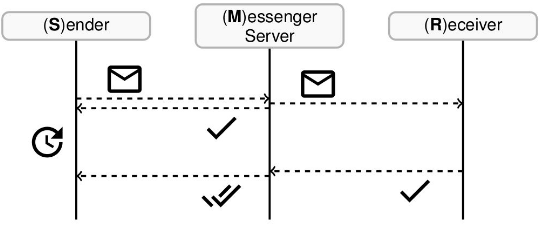
The script sends a reaction to a fake message ID every 5 seconds. This method is used to get
a server receipt without triggering a visible notification on the target's phone. By
measuring the time it takes for the server to return an inactive status, we get
the exact network delay.
The project is built using the whatsmeow library, a Go implementation of the WhatsApp web API.
Usage Requirements & Limitations
- Existing Chat: You must have a recent, active chat history with the target number. Sending pings to a new or empty chat significantly increases the risk of an account ban.
- Target Device State: For optimal results, the target should not have WhatsApp active on multiple devices (Web/Desktop), as this can split receipts and produce inconsistent data.
- Account Safety: I don't suggest to use your primary WhatsApp account for this. Automated activity can lead to permanent bans. Use a secondary
burnerSIM.
This project is for educational and research purposes only.
The techniques shown here demonstrate how messaging protocols can be used to:
- Perform timing-based attacks.
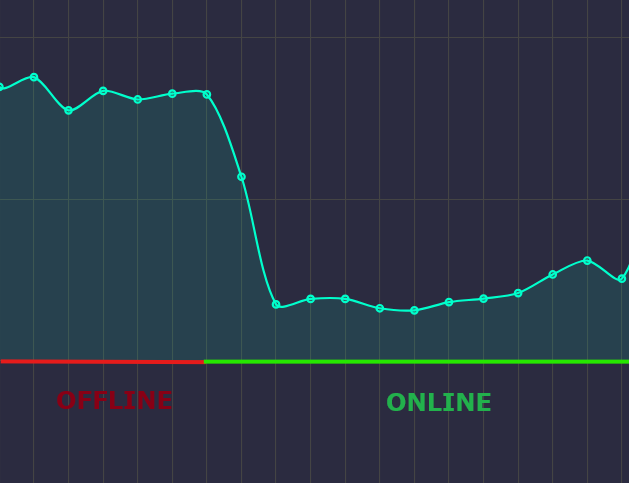
- Monitor a user's status (Online, Offline, or Active on phone) by analyzing receipt patterns.
- Gather metadata about a user's network environment.
The author is not responsible for any misuse, account bans, or privacy violations. Use this only on accounts you own or have explicit permission to test.
Example
Setup
1. Prerequisites
You need Go installed. On Windows, a C compiler (like MinGW) is required for the default SQLite driver.
2. Download
git clone https://github.com/li3less/WhatsappRTTAnalyzer.git
cd WhatsappRTTAnalyzer
3. Install
go mod tidy
4. Configure
Edit main.go and update the phone variable with the phone number you want to monitor (full international format, without +).
5. Run
go run main.go
6. Login
Scan the QR code in your terminal using the Linked Devices menu in WhatsApp. The web dashboard will open automatically at http://localhost:8080.